

A practical case study on AI-enabled productivity for real small businesses
Introduction: AI as a Daily Time-Saver for Small Businesses
Across the United States, small business owners are discovering that artificial intelligence can act as a quiet partner—handling daily tasks that once took precious hours away from sales, service, and creative work. While large companies often dominate headlines about automation, many of the most immediate gains are happening inside very small firms where every minute matters.
A recent feature from the U.S. Chamber of Commerce highlights this shift. One of the entrepreneurs profiled is Risa, a small business owner who began using generative AI to help with social media captions, routine emails, and back-office admin. Her experience is straightforward but meaningful: she saves at least one hour every day, without needing advanced technical skills or a complex AI strategy.
Her story reflects a wider trend. Many small businesses are not trying to reinvent their business models with AI. Instead, they use it to lighten the ongoing weight of everyday work—reducing administrative demands and creating more room to focus on customers and growth.
This article examines how those savings were achieved, what changed in her workflow, and what other business owners can learn from the process.
What This Case Study Is About: Reducing Admin Load Through AI
Risa’s business looks similar to many local enterprises: one person managing operations, marketing, customer communication, and day-to-day admin. Before adopting AI tools, these tasks piled up, often stretching her workday late into the evening.
Three areas consumed the most time:
- Social media content — Writing captions that matched her brand voice often took 20–30 minutes per post.
- Routine email communication — Responding to enquiries, preparing follow-ups, and maintaining a consistent tone took significant time.
- Back-office administration — Drafting invoices, summarizing notes, and preparing documents required repetitive writing and formatting.
None of these tasks are difficult on their own, but together they limit the owner’s capacity to focus on work that drives revenue and growth. AI became a practical way to fill that gap without hiring additional staff.
Why This Case Matters for Modern SMEs
Most small businesses operate with tight margins—of money, people, and especially time. Research from the U.S. Chamber and other organizations shows that founders often spend 20–40 percent of their workweek on administrative tasks. For solo operators or small teams, that often means less time for business development and customer care.
Saving just one hour a day adds up quickly. Over the course of a year, it amounts to more than 250 hours—about a full month of work. Recovering this time can allow businesses to:
- Serve more customers
- Produce content more consistently
- Improve product or service quality
- Reduce stress and burnout
- Respond faster than competitors
This case demonstrates that meaningful gains are possible with simple changes. AI becomes most valuable when it supports daily tasks—not when it replaces people or requires large-scale transformation.
Step-by-Step Breakdown of How AI Was Implemented
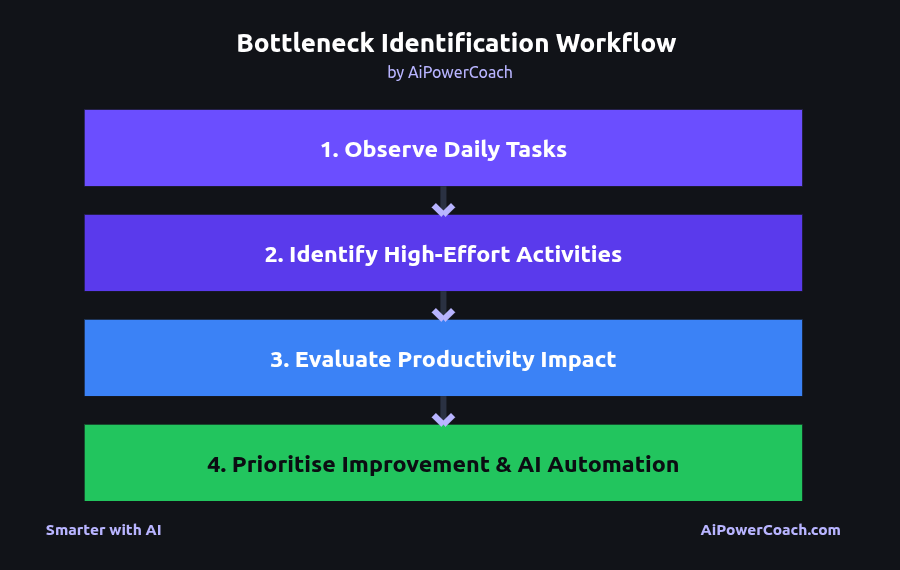
While the original Chamber article focuses on outcomes, the process leading to those results follows a pattern seen across many small businesses.
1. Identifying the Bottlenecks
Risa noticed that content creation and admin tasks interrupted her most productive hours. These activities became clear targets for improvement.
2. Selecting Accessible AI Tools
She adopted well-known generative AI tools, such as ChatGPT or similar systems, which are commonly used for text generation, brainstorming, editing, and summarizing.
3. Creating Simple Prompts and Templates
Instead of writing everything from scratch, she began using short, reusable instructions, such as:
- “Write a friendly caption for this product photo.”
- “Draft a reply to this customer email using a warm and professional tone.”
- “Summarize these notes in bullet points I can use later.”
This shift—from drafting to refining—led to immediate time savings.
4. Integrating AI Into Daily Routines
AI tools soon became a natural part of her workflow. Tasks that once required focused sessions now took just a few minutes.
5. Establishing Repeatable Workflows
As results became consistent, she began batching captions, drafting emails in the morning, and preparing admin documents weekly. This structure made savings predictable rather than occasional.
Operational Challenges and Root Causes
The issues AI addressed in this case are common across small businesses:
Manual content creation
Writing captions from scratch requires energy. Without templates, every post feels like starting from zero.
Repetitive email writing
Customer communication often repeats the same phrases, but still requires a personal touch.
Unstructured admin processes
Invoices, notes, and summaries are often created ad hoc with no standard format.
Context switching
Moving between admin, sales, and marketing several times a day increases cognitive load and slows productivity.
These challenges are structural, not personal. AI helps reduce the mental effort involved while creating more consistency.
AI Usage and Technical Breakdown of the Workflows
Risa used generative AI to support three major categories of work. Here’s how each typically functions.
1. Social Media Captions
AI tools generate text that matches tone, length, and style. The workflow usually includes:
- Describing or uploading the content
- Providing tone guidance
- Choosing from several options
- Making light edits to match the brand voice
This can reduce drafting time from 20–30 minutes to under five minutes.
2. Email Drafting and Editing
AI can:
- Write first drafts
- Turn bullet notes into polished messages
- Adjust tone
- Improve clarity and conciseness
For small businesses with frequent enquiries, this is often one of the most valuable time-saving applications.
3. Back-Office Administration
AI helps with:
- Summarizing meeting notes
- Producing short reports
- Drafting service descriptions
- Turning text into structured templates
Tools like ChatGPT, Claude, or Google Workspace AI fit naturally into daily workflows without requiring new software skills.
Key Metrics, KPIs, and Measurable Outcomes
The case study reports that Risa saved at least one hour per day. Based on common SME patterns, these gains likely came from:
- Faster content creation: drafting captions in minutes
- Quicker email responses: generating and refining drafts
- Reduced admin time: using AI for summaries and documents
If maintained throughout the year, the impact includes:
- 250+ hours regained
- Faster customer communication
- More consistent marketing output
- Less evening or weekend catch-up work
These results show how practical AI workflows directly support both productivity and well-being.
Lessons Small Businesses Can Apply Immediately
The case offers several takeaways for small business owners:
1. Start with tasks that drain the most energy
Choose one category—emails, social posts, or admin—and experiment with AI support.
2. Use simple, reusable prompts
Small prompt libraries are easier to maintain and deliver consistent results.
3. Build and use templates
Templates reduce decision fatigue and help AI tools perform more accurately.
4. Create routines that match your workflow
Morning email drafting or weekly admin sessions can make AI use more consistent.
5. Focus on the time saved, not the complexity
The most useful AI support is often invisible—it simply frees time for meaningful work.
How to Reproduce This Result: Templates, Playbooks, and Workflows
Small businesses can achieve similar gains through a simple process.
1. Create a Daily AI Admin Routine
Set aside 10–15 minutes to:
- Draft or reply to emails
- Summarize notes
- Convert tasks into checklists
2. Build a Prompt Library
Examples include:
- “Write three caption options for this product in a friendly tone.”
- “Rewrite this email to be concise and professional.”
- “Turn these bullet notes into a short summary.”
3. Batch Similar Tasks
Grouping tasks helps AI generate more consistent outputs and reduces context switching.
4. Use Beginner-Friendly Tools
ChatGPT, Google Workspace AI, and Canva AI offer accessible entry points for non-technical users.
5. Track Your Time Savings
Measuring before-and-after workflows helps refine AI use and highlights its value.
Risks, Trade-Offs, and Pitfalls
AI is powerful, but it has limitations. Small businesses should keep the following in mind:
Overreliance on AI-generated text
Review outputs carefully to ensure they remain true to your brand voice.
Quality drift over time
Prompts may need updating as your business evolves.
Privacy and data considerations
Handle sensitive customer information carefully and review platform policies.
Unclear instructions
AI produces weaker results when prompts are vague. Clear guidance works best.
AI is not a replacement for strong processes
AI enhances good workflows—it does not fix broken ones.
Conclusion: AI as an Immediate Advantage for Small Business Owners
Risa’s story is increasingly common. Many small business owners find that AI helps reclaim time that once felt permanently lost. One hour a day may seem modest, but reclaimed consistently, it can be the difference between staying afloat and moving forward.
This case shows that AI does not need to be intimidating or expensive. With a few simple workflows, small businesses can reduce administrative load and spend more time on the work that matters.
Call to Action: Start with One Workflow to Save Time Today
If you run a small business, choose one routine task—writing emails, posting on social media, or preparing admin documents—and try a simple AI workflow this week. Notice how much time it returns to your day.
AiPowerCoach offers clear guides, prompt libraries, and practical examples to help you take the next step.